 Skip to content

Table of Contents
For many small businesses, customer information is scattered across emails, spreadsheets, phone calls, contact forms, and messaging apps. This makes it difficult to know who needs a follow-up, which leads are most promising, or where each sales opportunity stands. CRM for Small Businesses provides a more organized way to bring these activities together and create a clearer view of the customer journey.
A customer relationship management system is more than a digital address book. It can help a small team record customer interactions, organize leads, track opportunities, schedule follow-ups, and understand how prospects move toward a purchase. IBM describes CRM as technology used to document, track, and manage relationships and interactions with existing and potential customers, including sales pipelines and lead generation. IBM’s CRM overview provides additional background on how these systems work. :contentReference[oaicite:0]{index=0}
For a growing company, the real value of CRM comes from creating a consistent process. Instead of relying on memory or disconnected tools, employees can work from the same customer information and follow a defined sales process. This article explains how small businesses can use CRM to manage customers, leads, and sales without turning the process into unnecessary administrative work.
For growing companies, CRM for Small Businesses can create a reliable foundation for organizing customer information, coordinating sales activities, and maintaining consistent follow-ups as the number of prospects and customers increases.

Why CRM for Small Businesses Matters
Small businesses often have fewer employees, which means one person may be responsible for sales, customer support, marketing, and follow-ups. When customer information is stored in different places, important details can easily become difficult to find. A CRM creates a central location for information that would otherwise remain scattered between individual tools.
CRM for Small Businesses helps smaller teams manage these responsibilities from a shared system instead of depending on separate notes, spreadsheets, or individual employee records.
Keep Customer Information Organized
A useful CRM can store contact details, previous conversations, notes, sales activity, appointments, and other relevant customer information in a structured record. This gives employees a clearer understanding of the relationship before contacting someone.
With CRM for Small Businesses, this information can become easier to access and update, giving employees a more complete picture of each customer before they begin a conversation.
For example, imagine a small IT services company receiving an inquiry from a potential customer. Without a CRM, the inquiry might remain in an employee’s inbox. If that employee becomes busy or another team member needs to take over, the opportunity can easily be overlooked. With a CRM, the lead can be recorded, assigned, followed up, and moved through the sales process.
This is one reason CRM for Small Businesses can be especially useful when several employees are responsible for different stages of the same customer journey.
Reduce Missed Follow-Ups
One of the biggest advantages of a CRM is visibility. Instead of asking which customers need a call or which prospects are waiting for a proposal, a sales team can review outstanding activities and upcoming follow-ups in one place.
For CRM for Small Businesses, better visibility means that owners and employees can quickly identify which customers require attention and which sales opportunities are waiting for the next step.
The U.S. Small Business Administration has highlighted lead tracking and follow-up as important reasons small businesses consider CRM systems. It also warns that disconnected emails, messages, and reminders can cause opportunities and commitments to fall through the cracks. The SBA’s CRM implementation guidance offers practical considerations for choosing and implementing a system. :contentReference[oaicite:1]{index=1}

How CRM Helps Manage Customers
Customer management does not end when someone makes a purchase. Existing customers may need technical support, renewals, additional services, product recommendations, or regular communication. A CRM helps a business maintain context throughout these interactions instead of treating every conversation as a completely new relationship.
CRM for Small Businesses can help companies continue managing the relationship after the initial sale by keeping customer history, communication, and future activities organized.
Create a Complete Customer Profile
A well-maintained customer record can provide a quick overview of the relationship. Depending on the CRM, this may include contact information, previous purchases, support interactions, communication history, notes, and scheduled activities.
A strong CRM for Small Businesses makes this information easier to review when employees need to understand a customer’s previous interactions, purchases, or support requirements.
This information becomes particularly valuable when several employees communicate with the same customer. Rather than relying on one employee’s memory, the team can review the available customer history and respond with greater consistency.
Improve Customer Communication
Good customer communication depends on timing and context. A business that knows what a customer previously purchased or discussed can make future conversations more relevant. CRM data can help teams identify opportunities to check in, renew services, address unresolved issues, or offer a relevant next step.
CRM for Small Businesses can support better timing by showing previous interactions, upcoming activities, and relevant customer information before an employee reaches out.
The SBA also recommends using customer data to understand purchasing behavior and improve outreach to existing customers. The objective is not simply to collect more information, but to use useful information to make customer communication more relevant. The SBA’s guidance on marketing to existing customers discusses this approach. :contentReference[oaicite:2]{index=2}

How CRM Helps Manage Leads and Sales
Managing leads effectively requires more than collecting names and email addresses. A business needs to know where each prospect came from, what they are interested in, whether they are qualified, what action should happen next, and how close they are to making a decision.
Capture and Qualify Leads
Leads can arrive through websites, referrals, advertising, social media, email, phone calls, and other channels. A CRM can bring these opportunities into a consistent workflow so that sales teams can review and prioritize them.
CRM for Small Businesses can bring these different lead sources into a more consistent workflow, making it easier to organize new inquiries and prevent promising prospects from being overlooked.
Lead qualification is particularly important for small teams because limited time should be spent on prospects with genuine potential. Microsoft describes lead management as a process that involves capturing, tracking, nurturing, and prioritizing potential customers before conversion. Microsoft Learn’s lead management documentation provides a detailed explanation of this process. :contentReference[oaicite:3]{index=3}
Visualize the Sales Pipeline
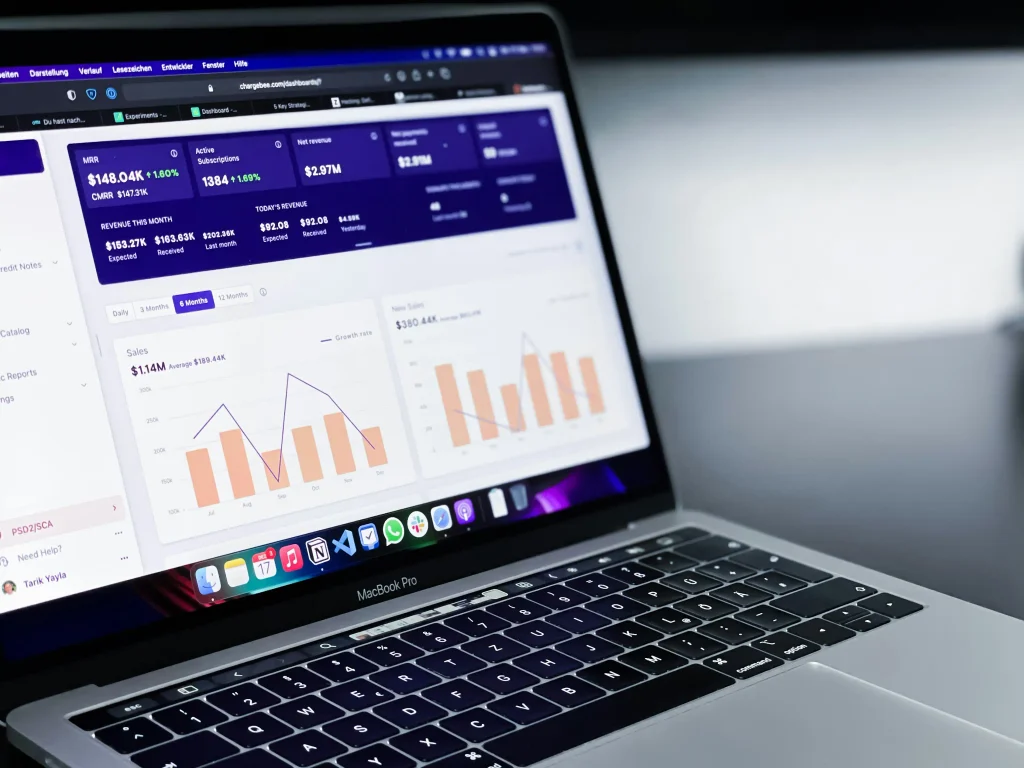
A sales pipeline gives the business a visual representation of its active opportunities. Instead of having a list of contacts with no indication of progress, the team can organize prospects according to stages such as new lead, qualified opportunity, proposal, negotiation, and closed deal.
For CRM for Small Businesses, a clear sales pipeline can turn a collection of contacts into a structured view of active opportunities and upcoming sales activities.
This makes it easier to identify stalled opportunities and determine where attention is needed. It can also help business owners estimate upcoming sales and understand whether there are enough active opportunities to support future revenue.
CRM for Small Businesses can therefore help sales teams prioritize opportunities based on their current stage rather than treating every contact as equally important.
A practical CRM for Small Businesses should therefore make the sales process easier to understand rather than adding another complicated administrative layer. The goal is simple: capture useful information, keep customer records organized, create clear next steps, and make it easier for the team to move qualified opportunities toward a decision.
1. What is CRM for Small Businesses?
CRM for Small Businesses is a customer relationship management system designed to help smaller companies organize customer information, manage leads, track sales opportunities, and maintain consistent communication. Instead of keeping customer details across spreadsheets, emails, notes, and separate applications, a CRM provides a centralized system for managing these interactions.
For a small company, this can make it easier to understand where each customer or prospect is in the sales process. Employees can review previous interactions, identify upcoming follow-ups, and determine what action should happen next. The goal is not simply to store more customer data, but to make that information useful for sales, customer service, and long-term relationship management.
CRM for Small Businesses also gives smaller teams a practical way to maintain customer history as their number of contacts and sales opportunities grows.
2. How does CRM help small businesses manage customers?
A CRM helps small businesses create organized customer profiles containing information such as contact details, communication history, notes, purchases, appointments, and follow-up activities. Having this information in one place allows employees to understand the customer’s history before starting a new conversation.
This can be particularly useful when multiple employees interact with the same customer. Instead of depending on one person’s memory, the team can access the available customer information and provide more consistent service.
3. Is CRM software for small business worth it?
CRM software for small business can be worthwhile when a company regularly manages multiple leads, customers, sales opportunities, or follow-ups. The value comes from reducing disorganization and giving employees a clearer process for managing relationships.
However, buying a CRM does not automatically improve a business. The system needs to match the company’s workflow, be easy for employees to use, and contain accurate information. A simple CRM that the team consistently uses can be more valuable than a complex system filled with unused features.
For companies experiencing these challenges, CRM for Small Businesses can provide a more structured alternative to manually managing customer and sales information.
4. Can a CRM help small businesses manage leads?
throughout the sales process. A lead can be assigned to a team member, given a specific sales stage, and connected to follow-up activities.
This makes it easier to distinguish between new inquiries, qualified prospects, active opportunities, and leads that are no longer being pursued. As a result, sales teams can focus their limited time on opportunities that are most relevant to the business.
5. How does CRM improve the sales process for a small business?
A CRM can make the sales process more visible by organizing opportunities into stages. For example, a company might use stages such as new lead, qualified lead, consultation, proposal, negotiation, and closed deal.
This allows business owners and sales teams to identify stalled opportunities, see which prospects require follow-up, and understand how many active opportunities are moving toward a potential sale. Over time, this information can also help businesses identify weaknesses in their sales process.
CRM for Small Businesses can make these sales patterns easier to monitor because opportunities remain organized according to defined stages and activities.
6. What features should a small business look for in a CRM?
Important features can include contact management, lead tracking, sales pipeline management, task and reminder tools, communication history, reporting, automation, integrations, and mobile access.
Small businesses should prioritize features that solve their actual operational problems. Paying for advanced functionality that employees rarely use can increase costs without creating meaningful value. Ease of use, reliable data management, and a clear workflow should generally come before an extensive list of features.
7. How much does CRM software for small business cost?
CRM pricing varies significantly depending on the provider, number of users, available features, storage, automation capabilities, integrations, and support options. Some providers offer free plans with limited functionality, while more advanced platforms use monthly or annual subscription pricing.
Businesses should evaluate the total cost rather than looking only at the advertised monthly price. Implementation, employee training, data migration, integrations, and additional users can also affect the overall investment.
8. What is the biggest CRM mistake small businesses make?
for using it. If employees continue keeping important information in personal spreadsheets, inboxes, or private notes, the CRM will quickly become incomplete.
Another common mistake is choosing a system that is unnecessarily complicated. A CRM should make customer and sales management easier. Before selecting one, a business should identify its essential workflows and choose a system that employees can realistically use consistently.
Choosing the Right CRM for Small Businesses
Not every CRM platform is a good fit for every small business. The best choice depends on the company’s size, sales process, number of customers, technical requirements, and budget. A system that works well for a large enterprise may contain features and workflows that create unnecessary complexity for a small team.
The right CRM for Small Businesses should match the company’s actual workflow, team size, customer volume, and technical requirements rather than simply offering the largest number of features.
When evaluating CRM software for small business, start with the problems you want the system to solve. If the main issue is missed follow-ups, task management and reminders may be more important than advanced analytics. If sales opportunities are difficult to track, pipeline management may be the priority.
Cloud-Based CRM vs. Spreadsheet
Spreadsheets can be useful when a business has a very small number of customers and a simple sales process. They are inexpensive, familiar, and easy to customize. However, spreadsheets become harder to maintain as customer information and sales activity increase.
A cloud-based CRM can provide structured customer records, permissions, automated workflows, reminders, reporting, and access from multiple devices. This can make it easier for teams to maintain a consistent process without depending on one master spreadsheet.
| Feature | Spreadsheet | CRM |
|---|---|---|
| Customer records | Basic | Structured |
| Lead tracking | Manual | Dedicated workflow |
| Sales pipeline | Usually manual | Built-in pipeline management |
| Follow-up reminders | Limited | Usually available |
| Automation | Limited | Often available |
| Team collaboration | Can become difficult | Designed for shared workflows |
| Reporting | Requires manual setup | Usually built in |
The right decision depends on the business. A spreadsheet may remain sufficient for a very small operation, while a CRM becomes increasingly useful when the company needs a repeatable process for managing customers, leads, and sales.
For many growing companies, CRM for Small Businesses becomes more valuable when customer records, leads, follow-ups, and sales opportunities can no longer be managed efficiently through a single spreadsheet.

Best Practices for Using a CRM
Installing a CRM is only the beginning. The quality of the results depends heavily on how consistently the business uses the system. A simple process that employees follow every day is generally more effective than a complicated system that is only updated occasionally.
To get meaningful results from CRM for Small Businesses, teams need clear rules for entering information, updating customer records, managing leads, and completing follow-up activities.
Define Your Sales Process First
Before creating CRM stages, map out how a typical prospect becomes a customer. Identify where leads come from, how they are qualified, when a proposal is created, and what happens after a sale.
This gives the CRM a practical structure. Instead of creating stages simply because the software provides them, the business can build a pipeline around its actual sales process.
Keep Customer Data Clean
Duplicate records, outdated contact information, incomplete profiles, and inconsistent naming conventions can reduce the value of CRM data. Establish basic rules for entering and updating customer information.
For example, decide which fields are essential, how company names should be entered, and who is responsible for updating records. Regular data maintenance helps employees trust the information they see in the system.
Record Meaningful Interactions
Not every conversation needs extensive documentation. However, important customer decisions, requirements, objections, proposals, and follow-up commitments should be recorded. These notes give the team useful context when the next interaction occurs.
Automate Repetitive Tasks Carefully
Automation can help with repetitive activities such as reminders, lead assignments, follow-up notifications, and routine communication. However, automation should support the customer experience rather than replace thoughtful communication.
Used correctly, CRM for Small Businesses can reduce repetitive administrative work while allowing employees to spend more time on meaningful customer and sales interactions.
Start with a small number of useful automations and evaluate their results. Adding too many automated messages at once can create unnecessary notifications and make the customer experience feel impersonal.

Common CRM Mistakes Small Businesses Should Avoid
CRM problems are not always caused by the software itself. In many cases, implementation decisions and poor data practices are responsible. Understanding common mistakes before adopting a CRM can save time and money.
Choosing Too Many Features
A long list of features can make a CRM look attractive, but more functionality does not necessarily mean better results. Small businesses should focus on the tools they actually need rather than paying for complicated features that employees will never use.
Failing to Train Employees
Employees need to understand why the CRM is being introduced and how it fits into their daily responsibilities. Without basic training, users may return to familiar spreadsheets, personal notes, or email-based processes.
Ignoring Data Quality
Incorrect or incomplete information can make reports unreliable and lead to poor decisions. Establishing clear data-entry standards from the beginning makes the CRM more useful as the business grows.
Expecting Immediate Results
A CRM does not automatically generate more customers or close more sales. It provides a system for organizing and improving the activities that contribute to those outcomes. Businesses should give employees time to adopt the workflow and use performance data to improve it.
How Much Does CRM for Small Businesses Cost?
The cost of CRM for Small Businesses can range from free plans to substantial monthly subscriptions, depending on the provider and the required functionality. Pricing may be based on the number of users, available features, storage, automation, integrations, or customer support.
When evaluating CRM for Small Businesses, companies should consider both the software price and the potential value of better organization, faster follow-ups, improved sales visibility, and reduced administrative work.
However, the subscription price is only one part of the total cost. Businesses should also consider setup time, employee training, migration of existing customer data, integration with other systems, and ongoing administration.
A useful way to evaluate the investment is to compare the cost with the operational problems the CRM is expected to solve. If missed follow-ups regularly result in lost opportunities, even a modest CRM investment may provide meaningful value. On the other hand, a company with only a handful of customers and almost no recurring sales activity may not need an advanced platform.
Before purchasing a system, create a short list of essential requirements. This might include contact management, lead tracking, pipeline visibility, reminders, reporting, and integrations with tools the company already uses. Then compare plans based on those requirements rather than choosing the platform with the largest feature list.
When Should a Small Business Start Using a CRM?
There is no single customer or employee threshold that determines when a company needs a CRM. The more useful question is whether customer and sales information has become difficult to manage using the tools currently available.
CRM for Small Businesses becomes particularly useful when customer information is growing faster than the team can comfortably organize it with existing tools.
If leads are being forgotten, employees cannot easily find customer history, sales opportunities have no clear status, or follow-ups depend heavily on memory, it may be time to consider a CRM.
Starting earlier can also help a business establish good data and sales habits before customer volume becomes difficult to manage. However, implementation should remain proportional to the company’s needs. A small business does not necessarily need an enterprise-level system to create a reliable customer management process.
Conclusion: Build a Smarter Customer Management Process
CRM for Small Businesses can provide a practical foundation for managing customer relationships, organizing leads, and creating a more visible sales process. Instead of allowing important information to remain scattered across inboxes, spreadsheets, and individual notes, a CRM gives businesses a structured place to manage customer activity.
The most effective approach is not simply to purchase software and expect results. Start by identifying the company’s biggest customer and sales challenges, define a straightforward workflow, choose features that address those challenges, and train employees to use the system consistently.
Ultimately, CRM for Small Businesses works best when technology and business processes support each other, giving employees a clear system for managing relationships while giving owners better visibility into sales performance.
As the business grows, the CRM can become more than a contact database. With clean information and a well-defined process, it can help teams understand their sales pipeline, prioritize leads, improve follow-ups, and make more informed decisions about customer relationships.
Need Help Improving Your Business Technology?
Choosing and implementing the right technology can be challenging when a small business is already focused on serving customers and generating sales. If your current systems are difficult to manage or your team is losing time to repetitive processes, the right technology strategy can make a meaningful difference.
Explore the IT-F1 services to learn more about technology solutions for business needs, or visit the contact page to discuss your requirements and identify practical next steps.
You can also explore cloud solutions if your business needs more flexible access to its systems and data, or review digital marketing services when customer acquisition and online growth are part of your broader business strategy.

How to Set Up a CRM Process for a Small Business
Choosing CRM software is only one part of building an effective customer management system. The more important step is deciding how your team will use that system every day. A CRM works best when it reflects the actual way your business captures leads, communicates with customers, follows opportunities, and closes sales.
Modern CRM systems can connect lead capture, sales activity, customer information, and follow-up processes in one environment. Microsoft describes CRM solutions as tools that can centralize customer information, track sales pipelines, and automate follow-up activities. Microsoft’s CRM guidance for small businesses provides additional information about these capabilities. :contentReference[oaicite:0]{index=0}
1. Define What You Want the CRM to Solve
Before importing contacts or configuring sales stages, identify the problems that are costing your business time or opportunities. Perhaps leads are arriving from several sources and nobody knows who should respond. Maybe sales representatives forget follow-ups, or customer information is spread across multiple spreadsheets.
Write down the two or three most important problems. This creates a practical foundation for selecting and configuring the CRM. The U.S. Small Business Administration recommends focusing on a company’s specific needs when evaluating CRM systems rather than choosing a platform simply because it has a long list of features. The SBA’s CRM implementation guidance supports this needs-first approach. :contentReference[oaicite:1]{index=1}
2. Create Clear Lead Stages
Your CRM should make it immediately obvious where every potential customer stands. A simple sales pipeline might include New Lead, Contacted, Qualified, Proposal Sent, Negotiation, Won, and Lost.
The exact stages should reflect your business. A web design company, for example, may need stages for discovery call, proposal, revision, approval, and project kickoff. An IT support company may use a different workflow.
Clear stages help employees understand what action should happen next. They also make sales reporting more meaningful because management can see where opportunities are accumulating or becoming stalled.
3. Establish Follow-Up Rules
Every qualified lead should have a clear next action. That might be a phone call, email, product demonstration, proposal, consultation, or scheduled check-in.
A simple rule can make the CRM much more effective: if a lead is active, it should have an owner and a next activity. This prevents opportunities from remaining in the pipeline without anyone actively moving them forward.
4. Connect the CRM With Existing Business Tools
A CRM becomes more useful when it fits into the tools your team already uses. Depending on the platform, integrations may connect email, calendars, websites, marketing tools, customer service systems, accounting applications, or communication platforms.
The objective should not be to connect every possible application. Instead, prioritize integrations that eliminate repetitive data entry or reduce the risk of information becoming isolated in different systems.
How to Measure CRM Success
Installing CRM software does not automatically mean the business is improving. You need measurable indicators to determine whether the system is actually helping the team work more effectively.
Lead Response Time
Measure how quickly your team responds to new inquiries. If a business receives a lead through its website but waits several days before contacting the prospect, the CRM should help identify and reduce that delay.
Lead Conversion Rate
Track how many qualified leads eventually become customers. This can help reveal whether your business is attracting the right prospects and whether the sales process is effective.
Sales Cycle Length
Measure the average time it takes to move an opportunity from initial qualification to a completed sale. If the sales cycle becomes shorter without reducing customer quality or satisfaction, the CRM process may be helping employees work more efficiently.
Follow-Up Completion
Track whether scheduled sales activities are actually completed. This is particularly useful for businesses that previously relied on memory, spreadsheets, or personal reminders to manage customer communication.
Customer Retention and Repeat Business
A CRM should not focus exclusively on acquiring new customers. Existing customers can represent important opportunities for renewals, additional services, repeat purchases, and referrals.
Tracking customer activity can help businesses identify relationships that require attention and opportunities to provide relevant additional value.
CRM Security and Customer Data Protection
Customer relationship management systems contain valuable business information. Depending on the company, this can include names, email addresses, phone numbers, purchase history, communication records, contracts, and other sensitive information.
For this reason, security should be considered when selecting and configuring a CRM. Businesses should understand how access permissions work, who can view customer information, how accounts are protected, and how data is backed up.
Employees should also understand basic security responsibilities. Strong passwords, appropriate permissions, secure devices, and careful handling of customer information are important parts of responsible CRM management.
Data protection requirements can vary depending on the customer’s location, industry, and type of information being collected. Businesses should therefore review applicable legal and regulatory requirements rather than assuming that every CRM configuration is automatically compliant.
When a CRM Should Be Integrated With Other IT Services
CRM rarely operates in complete isolation. A business may need its customer management system to work alongside cloud services, websites, cybersecurity tools, marketing platforms, data backup solutions, or managed IT services.
For example, a website can capture new inquiries and send them into a CRM. A cloud environment can provide employees with secure access to business applications. Security controls can help protect customer information, while backup and recovery systems can reduce the impact of data loss.
This is where technology planning becomes important. Instead of purchasing individual tools without considering the wider environment, small businesses can evaluate how their systems work together.
Businesses looking to improve their broader technology environment can explore cloud solutions, cybersecurity solutions, and managed IT services as part of a wider technology strategy.
CRM Is a Process, Not Just Software
One of the most important lessons for small businesses is that CRM success depends more on process and adoption than on the software itself. A sophisticated platform will not solve a problem if employees do not update records, assign leads, complete follow-ups, or use the system consistently.
A simpler system with clear rules can produce better results because employees understand what information belongs in it and what they are expected to do next.
Start small. Define your pipeline, establish essential customer fields, create follow-up rules, and train employees on the workflow. Once the process is working reliably, you can gradually introduce automation, reporting, integrations, and more advanced features.
Final Takeaway: Build a CRM System That Supports Growth
CRM for Small Businesses should ultimately make customer management easier, not more complicated. The right approach gives employees a shared view of customers, creates visibility into sales opportunities, and reduces the risk of important follow-ups being forgotten.
CRM can also provide a stronger foundation for growth. When customer information is organized and sales activity is measurable, business owners can make decisions based on actual information instead of relying entirely on memory or disconnected spreadsheets.
The best starting point is therefore not to search for the CRM with the largest feature list. Start with your business problems, define the workflow you need, choose technology that fits that workflow, and create clear rules for how the system will be maintained.
If your current business technology is becoming difficult to manage, IT-F1 can help you explore practical technology solutions based on your business requirements. Visit the IT-F1 services page to explore available solutions or use the contact page to discuss your technology needs.
You can also explore the IT-F1 portfolio to learn more about the type of technology work and solutions available for businesses.